
Bring Your VRChat Avatars To Life

Stuck in a T-Pose? Skip the complex Blender weight-painting and Unity Animator graphs. Upload your static 3D model to instantly auto-rig, apply custom emotes, idle animations, and dances perfectly formatted for VRChat.
Explore Animations

The Easiest Animation & Rigging Tool for VRChat

Designed for VRChat creators who want to make their avatars dance, wave, or just stand naturally without fighting broken bones or missing animator errors.

1-Click Auto Rigging

Idle & Locomotion

Dances & Emotes

AFK Animations

Fix T-Pose Errors

VRC SDK Ready

From static mesh to dancing avatar in minutes

Animating an avatar used to mean hours in Blender setting up armatures, fixing broken fingers in Mixamo, and crying over Unity's Playable Layers. Our workspace automates the entire rigging and animation pipeline.
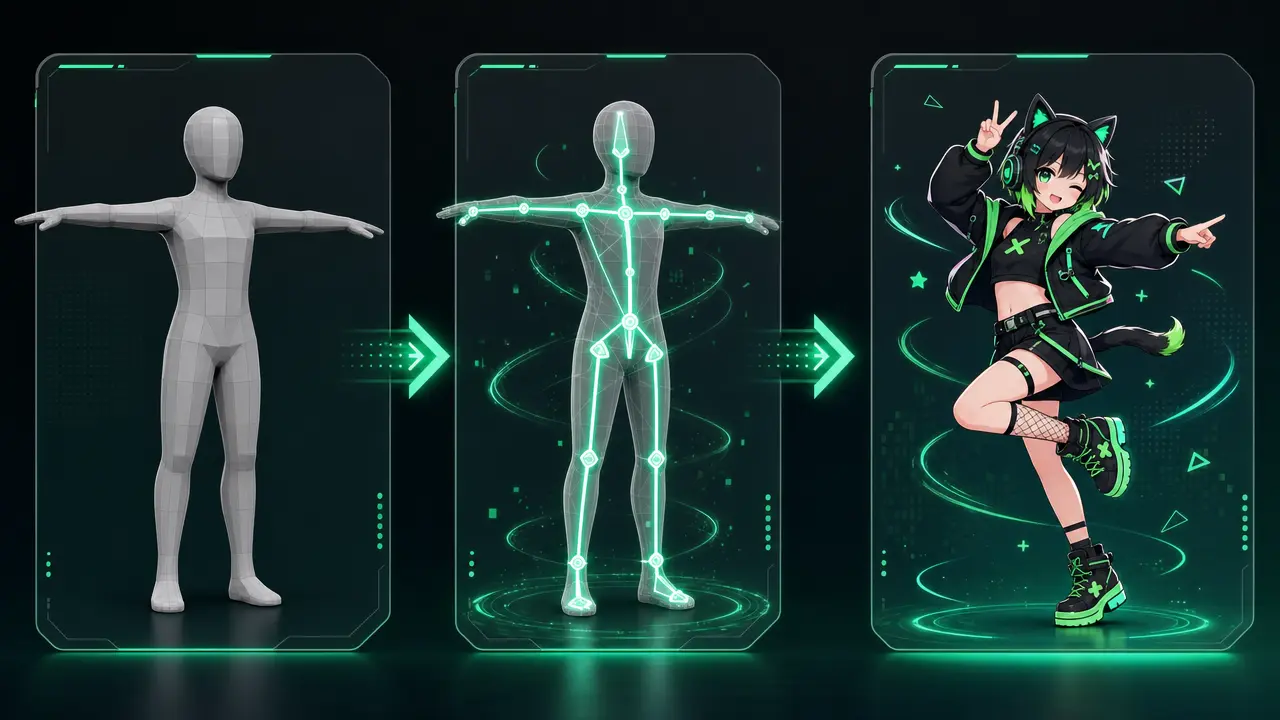
Smart Auto-Rigging

Upload any generated or custom static 3D model. Our AI automatically maps the humanoid skeleton, ensuring perfect compatibility with VRChat's bone requirements.

Apply VRChat-Ready Animations

Choose from a library of custom emotes, cute AFK poses, sitting animations, and viral dances. Preview them instantly in the 3D viewer.

Export with confidence

Download your fully rigged FBX with animations attached. No more 'Avatar does not contain an animator' errors when uploading via the Creator Companion.
Pipeline showing a static avatar turning into a rigged and fully animated VRChat character

Why struggle with manual rigging and animating?

If you've ever uploaded an avatar only to find it sliding across the floor in a rigid T-pose, this tool is built for you.
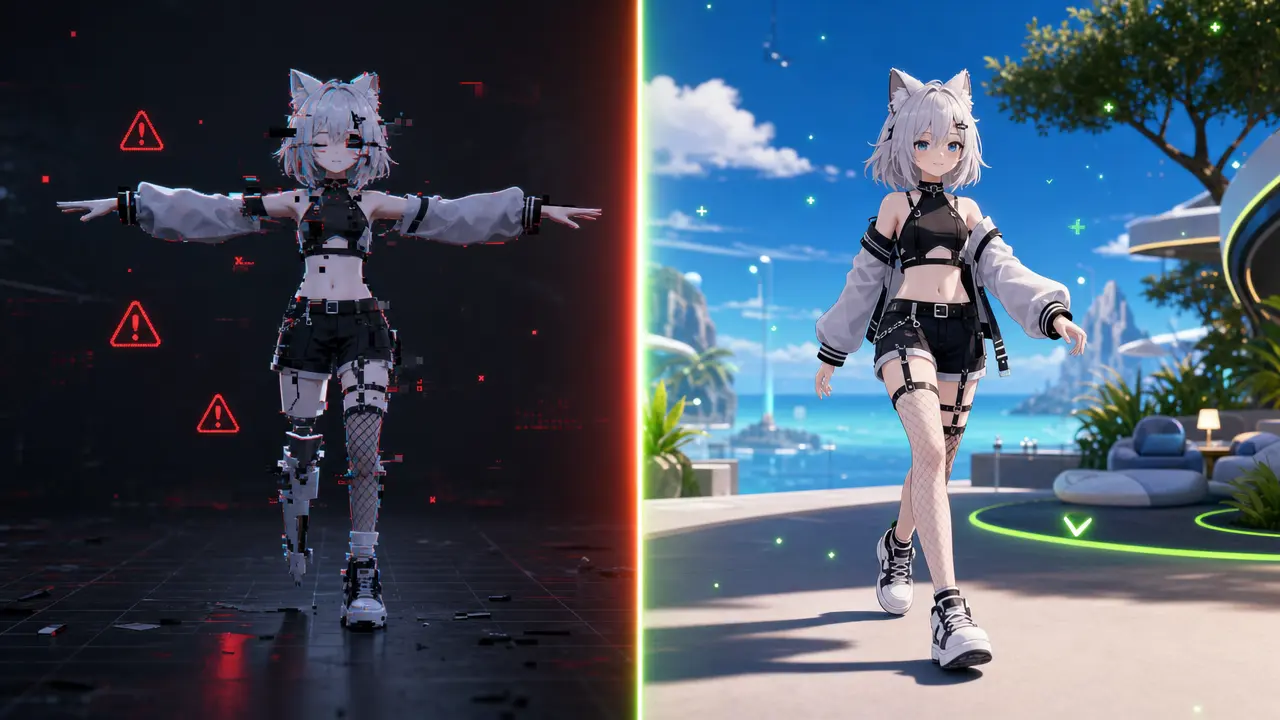
No More Blender Nightmares

Skip the tedious process of placing bones and weight painting. Our AI auto-rigger handles complex meshes, including tails and ears, flawlessly.
  • Perfect humanoid bone mapping
  • Fixes broken Mixamo fingers automatically
  • Optimized for Full Body Tracking (FBT)

Bypass Unity Animation Headaches

Setting up FX layers and Action Menus in Unity SDK 3.0 is confusing. Get pre-configured animations that just work out of the box.
  • Eliminate 'missing animator' errors
  • Smooth idle breathing and walking loops
  • Test animations online before launching Unity

Express Your Character's Personality

An avatar without custom animations feels dead. Easily add that cute ear twitch, confident walk, or funny dance to stand out in the lobby.
  • Hundreds of emote and dance presets
  • Customizable AFK and sitting poses
  • Perfect for TikTok/YouTube VR recording
Comparison of a broken T-pose avatar in Unity vs a smoothly animated avatar in VRChat Avatar Maker

How to rig and animate your avatar

Turn your static character into a fully moving, breathing VRChat avatar in four simple steps.

01

Select your static model

Use a 3D model you just generated in our Text-to-Avatar workspace, or upload your own un-rigged OBJ/FBX/GLB file.

02

Run the Auto-Rigger

Click 'Auto Rig'. Our AI will calculate the mesh, insert a VRChat-compatible humanoid skeleton, and apply perfect weight painting.

03

Assign Animations

Browse our animation library. Apply your favorite idle pose, walk cycle, AFK state, or custom dance emotes to the rigged model.

04

Preview & Download

Watch your avatar move in real-time. Once you're happy, download the FBX file ready to be dropped straight into Unity and uploaded to VRC.

Animation features built for the VRChat SDK

We provide everything you need to ensure your avatar moves beautifully in desktop mode, standard VR, and Full Body Tracking (FBT).

VRChat-Standard Auto Rigging

Our rigger is strictly configured to match the Unity Humanoid rig standard required by VRChat, preventing upload rejections.
  • Strict Humanoid bone hierarchy
  • Proper spine and chest mapping
  • Ready for Full Body Tracking (FBT)

Idle & Locomotion Generators

Replace the stiff default VRChat walk. Choose from confident strides, cute skips, zombie shambles, or floating animations.
  • Custom walking & running cycles
  • Breathing and subtle idle movements
  • Crouching and prone animations

Viral Dances & Emotes

Equip your avatar's Action Menu with the best dances, waves, backflips, and memes without having to hunt for animation files online.
  • TikTok and popular meme dances
  • Smooth loop transitions
  • Expressive hand gestures

Custom AFK & Sitting Poses

Don't just cross your legs in the air. Add custom sitting animations for chairs, and unique AFK poses (like sleeping or reading) when you take off your headset.
  • Floating, sitting, or lying AFK states
  • Cross-legged or elegant chair sitting
  • Instantly adds polish to your avatar

Physics & Dynamic Bone Prep

Our rig structures ensure that when you add PhysBones in Unity (for hair, tails, and ears), they flow naturally with your new animations.
  • Clean bone structure for PhysBones
  • Prevents mesh tearing during extreme poses
  • Optimized joint rotation limits

One-Click VRC Fixer

Automatically fixes common issues like 'Avatar feet in floor', 'Arms stuck at sides', or incorrect view positions based on the new rig.
  • Fixes 'feet clipping through ground'
  • Corrects scale and bounding box issues
  • Ensures perfect T-Pose for Unity import

Stop fighting the SDK. Start playing.

We automated the hardest part of VRChat avatar creation so you can get into the game faster.

< 1 Min

Rigging Time

Auto-generate a perfect VRChat humanoid skeleton instantly.

100+

Animation Presets

A massive library of dances, idles, and AFK motions ready to apply.

0

T-Pose Errors

Exported models are guaranteed to pass VRChat SDK animation checks.

What VRChat creators say

Join the thousands of users who finally got their avatars moving thanks to our auto-rigging and animation workspace.

★★★★★
I spent 3 days watching tutorials on how to fix 'avatar does not contain an animator'. I uploaded my model here, clicked Auto-Rig, downloaded it, and it just worked. I could cry.
VRC_Newbie

VRC_Newbie

Desktop Player

★★★★★
Mixamo always messed up the fingers and shoulders on my anime models. The auto-rigger here is actually built for VRChat proportions. Plus, adding the custom dance emotes is literally one click.
Kira3D

Kira3D

Avatar Modder

★★★★★
I just wanted a cute AFK floating animation for when I take my headset off. This tool let me preview and apply it to my model before I even opened Unity. Huge time saver.
FBT_Dancer

FBT_Dancer

Full Body Tracking User

Frequently Asked Questions about Animation & Rigging

Troubleshooting T-poses, rigging issues, and custom emotes for VRChat.

This error happens when your 3D model isn't rigged properly or Unity doesn't recognize it as a 'Humanoid'. Our Auto-Rigger fixes this by generating a strict VRChat-compatible skeleton and animator component for you to download.
A stuck T-pose usually means your rig's bone mapping is broken, or you are missing an avatar descriptor/animator. Running your model through our Animation workspace ensures all bones are mapped correctly so you can move normally.
Traditionally, you'd have to find animation files and manually wire them into Unity's Action Menu and Playable Layers. Our tool lets you select dances and emotes online, embedding them into your avatar asset automatically.
Yes! You can choose from our library of AFK animations (sleeping, floating, reading) and apply them to your avatar. When you take off your VR headset, your avatar will perform this animation instead of the default pose.
No. Our built-in Auto-Rigger and Animation library replaces the need for Mixamo. In fact, our rigger is better optimized for VRChat's specific bone requirements, avoiding the common 'Mixamo broken fingers' issue.
Absolutely. Our auto-generated rigs are fully optimized for VRChat's IK (Inverse Kinematics) system, ensuring smooth tracking for 6-point and SlimeVR setups.

Make Your Avatar Move Today

Stop settling for stiff, broken models. Open the workspace, auto-rig your character, and add incredible animations in minutes.