Create Custom VRChat Textures & Clothes In Seconds

Stop struggling with Blender and UV maps. Upload your 3D model, describe the look, or upload a reference image, and let AI generate perfect textures, custom clothing, and skins for your VRChat avatar instantly.
See How It Works

Breathe life into blank models with one click

Whether you want to add an e-girl outfit to an anime base, generate a complex furry pattern for a Rexouium, or fix a 'pink texture' error, our AI Texturing workspace handles the heavy lifting so you can focus on creativity.
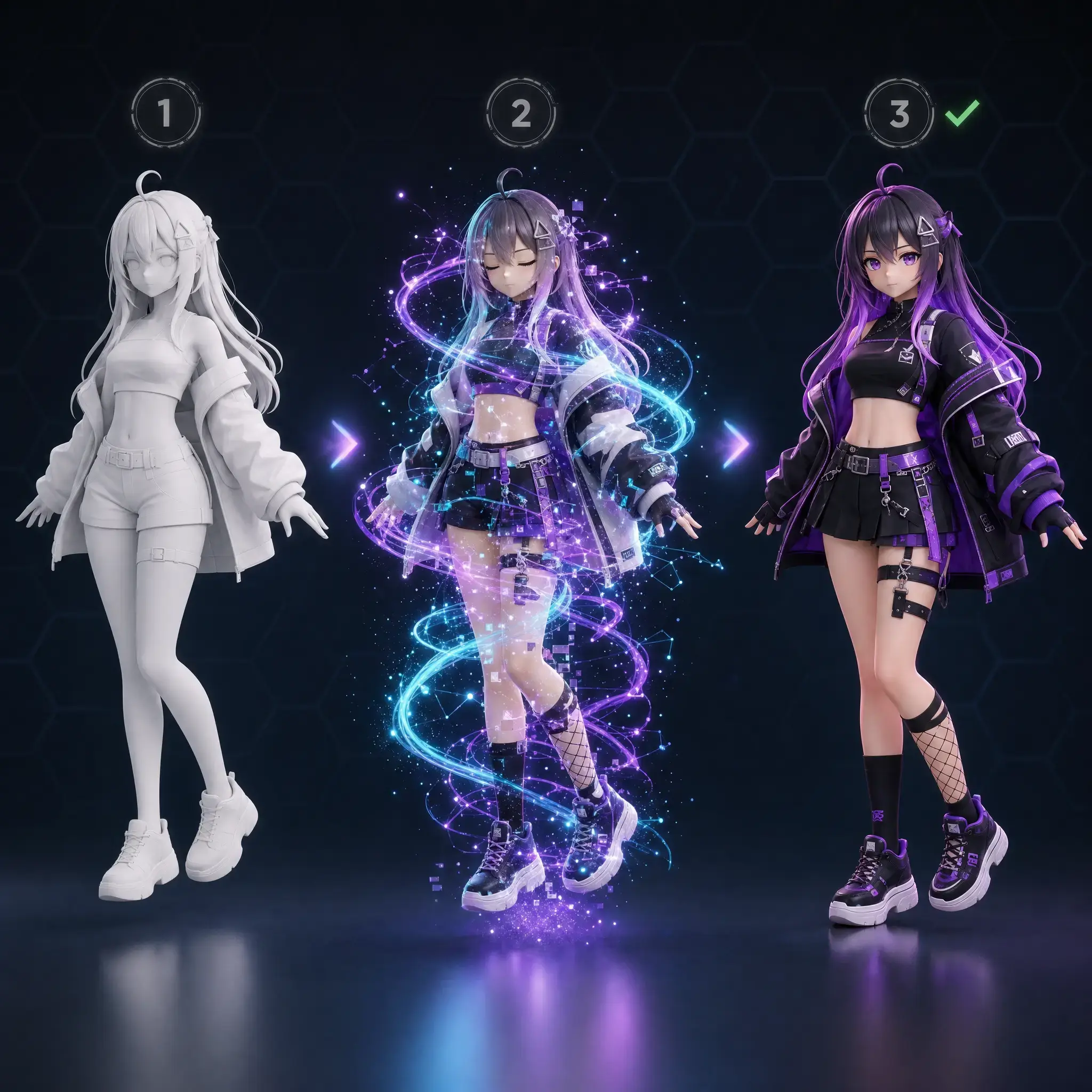
Upload your base model

Bring in your own untextured GLB/FBX files, or use models generated from our Text-to-Avatar workspace.

Describe the outfit or skin

Type 'tactical techwear jacket', 'glowing cyberpunk tattoos', or 'pastel maid dress'. Our AI paints it directly onto the mesh.

Export and upload to VRChat

Download the textured model perfectly mapped and ready to be dropped into the VRChat Creator Companion (VCC).
VRChat avatar texturing pipeline from blank model to colored textures

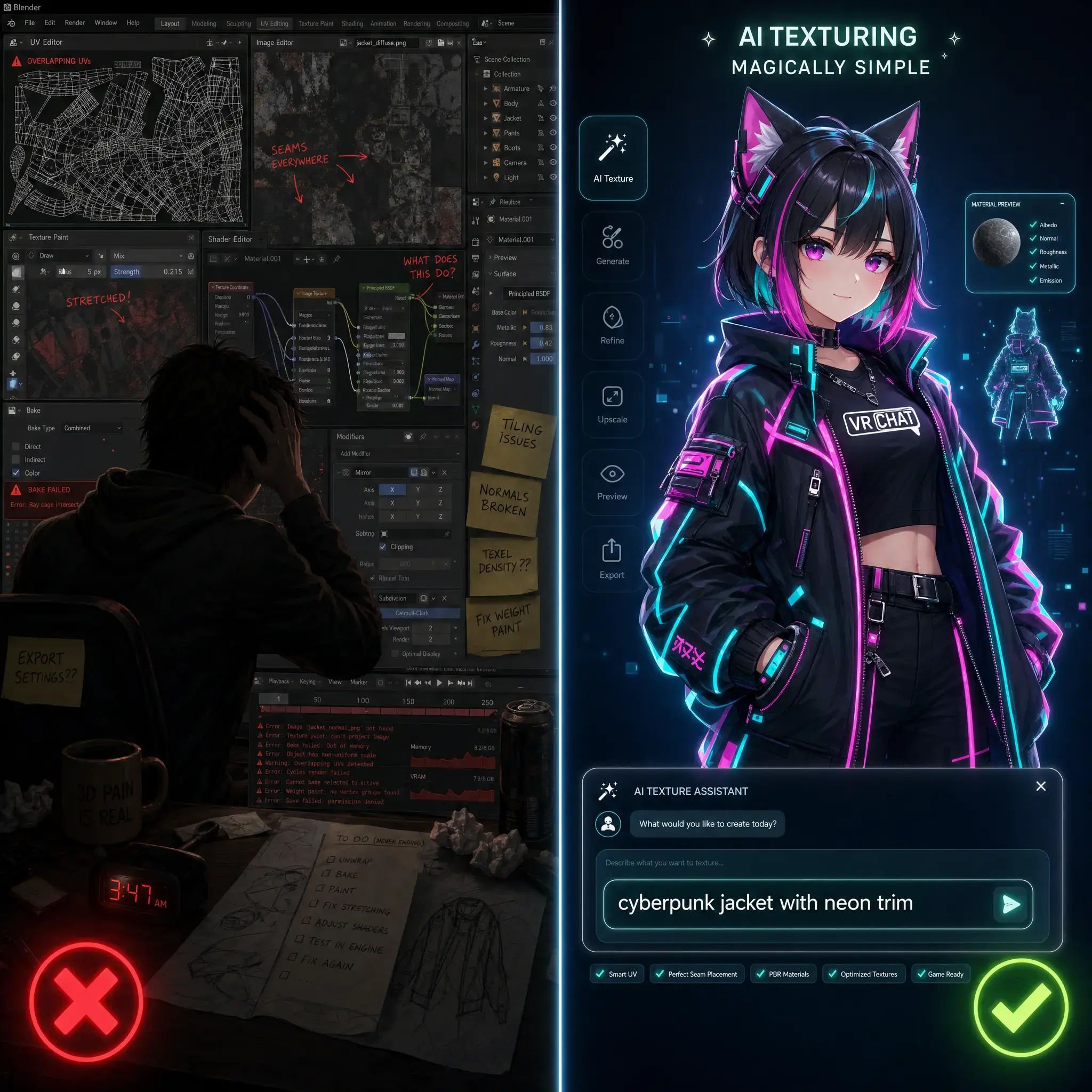
Why creators choose AI for VRChat texturing

VRChat users don't want to spend weeks learning Blender just to change a shirt color. They want a fast, fun way to express their identity in VR.
Zero Blender Skills Needed

Skip the nightmare of UV unwrapping, weight painting, and manual texturing. If you can type, you can texture.
  • No complex software to install
  • Automatically handles UV mapping
  • Perfect for VRChat beginners

Infinite Style Variations

Try 10 different outfits or color palettes in 10 minutes. Iterate endlessly until your avatar looks perfect.
  • Change clothes with a single prompt
  • Test color palettes for furry avatars
  • Easily create matching couple avatars

Fix & Enhance Existing Models

Got a free base model from Booth or Gumroad but hate the default look? Easily repaint it to make it uniquely yours.
  • Customize popular public bases
  • Add details like tattoos or scars
  • Fix missing texture (pink avatar) issues
Comparison of manual texturing in Blender vs AI texturing for VRChat avatars

How to add textures & clothes online

Follow this simple workflow to transform a blank 3D model into a fully customized VRChat avatar ready for the metaverse.

01

Select or upload your model

Choose a 3D model you generated in our workspace, or upload your own untextured base avatar (FBX/GLB).

02

Input your style prompt

Describe the clothing, material, colors, and vibe. You can also upload a reference image to guide the AI's artistic style.

03

Let AI paint the textures

Watch as the AI intelligently wraps textures, patterns, and clothing details around your 3D model in real-time.

04

Download for Unity

Preview your new look in the 3D viewer, then download the textured asset to upload straight to VRChat via Unity.

Texturing features tailored for VRChat

Everything you need to make your avatar stand out in the mirror lobby, built specifically for the VRChat community.

Text-to-Texture Generation

Turn words into wearable 3D art. Generate intricate outfits, armor, or casual streetwear just by describing them.
  • Generates high-res PBR textures
  • Understands complex clothing layers
  • Adapts to the shape of your model

Image-to-Texture Style Transfer

Have a 2D drawing of your OC? Upload it, and the AI will project those exact colors and patterns onto your 3D avatar.
  • Perfect for recreating 2D OC designs
  • Matches reference color palettes perfectly
  • Maintains character consistency

Furry & Kemono Optimized

Easily generate custom fur patterns, scales, or feather textures for your Protogen, Rexouium, or Nardoragon bases.
  • Seamless animal patterns
  • Supports complex tail and ear coloring
  • Great for furry avatar commissions

Smart Material Repainting

Don't like a specific part of the generated texture? Select it and ask the AI to repaint just the jacket, the eyes, or the shoes.
  • Localized texture editing
  • Change eye color or add makeup
  • Add decals, logos, or tattoos

Quest & PC Compatible

Generate optimized textures that look great on PCVR while keeping file sizes small enough for standalone Meta Quest users.
  • Bake lighting for Quest avatars
  • Adjust texture resolution easily
  • Avoid 'Very Poor' performance ranks

Auto Rigging Integration

Once your avatar looks perfect, send it straight to our Auto Rigger to get it moving with VRChat-compatible bones.
  • Seamless transition to rigging
  • Test textures with idle animations
  • Complete the VRChat pipeline

Popular VRChat Texturing Styles

See how users are transforming basic models into stunning custom avatars using our AI texturing workspace.

E-Boy / E-Girl Streetwear

Generate oversized hoodies, cargo pants, chains, and alternative fashion styles popular in VRChat club worlds.

Custom Furry Patterns

Easily apply galaxy patterns, neon stripes, or realistic fur textures to popular canine and dragon bases.

Anime RPG Fantasy

Dress your anime avatars in detailed knight armor, magical girl outfits, or elegant kimono textures instantly.

Loved by VRChat creators and players

Here is what users are saying about ditching manual texturing for our AI-powered workspace.
★★★★★
Trying to learn how to add clothes to an avatar in Blender literally made me want to cry. This tool lets me just type 'goth dress' and it magically appears. Life saver!
Luna_VRC

Luna_VRC

Casual VRChat Player

★★★★★
I do a lot of furry avatar commissions. I use this to quickly generate base textures and color palettes for my clients to approve before I do the final polish. Speeds up my workflow massively.
TailsAndPolys

TailsAndPolys

Avatar Commisioner

★★★★★
I had a bunch of free Booth models that looked too generic. Being able to upload them and retexture them with cyberpunk neon styles makes my avatars actually unique now.
CyberPhantom

CyberPhantom

World Hopper

Frequently Asked Questions about Avatar Texturing

Answers to the most common questions on how to add clothes, fix textures, and customize VRChat avatars.

Traditionally, you'd need Blender to fit clothing meshes and weight paint them. With our tool, you just upload your base model and type the clothing description. The AI generates the clothing texture directly onto your model.
No Blender skills are needed! Our AI handles the UV mapping and texturing. You will only need basic Unity knowledge (VRChat Creator Companion) to upload the final downloaded file into the game.
A 'pink avatar' means your materials or textures are missing/broken. You can upload that model here, generate brand new textures for it, and download a fixed, fully-textured version.
Yes! You can upload your own untextured or generic FBX/GLB files and use our Image-to-Texture or Text-to-Texture tools to give them a completely custom look.
Yes. Our AI generates baked textures that are highly optimized. This is perfect for creating Quest-compatible avatars that look great without causing performance issues or 'Very Poor' ratings.
Yes, using our prompt system and reference image uploads, you can guide the AI to place specific details, markings, or tattoos on your character's skin or clothing.

Give your Avatar a Custom Look Today

Stop settling for default skins. Open the workspace, upload your model, and let AI generate the perfect clothes and textures for your VRChat identity.